Agent Teams: The Commander and His Crew

In one of my previous posts I wrote about how our role as IT people is shifting — as we desperately try to stay afloat a little longer before inevitably having to retrain for more practical professions. The question then is: how do we manage agents that, in terms of behavioral patterns, closely resemble the chaotic crew of a rattling jalopy barreling across the steppe? The Commander managed them just fine — so let’s give it a shot ourselves.
(For those unfamiliar: Ostap Bender is the legendary con man from the classic Soviet novels by Ilf and Petrov — “The Golden Calf” and “The Twelve Chairs.” His crew — Balaganov, Panikovsky, and Kozlevich — are a colorful band of misfits who somehow get things done. The “Antelope Gnu” is their car. The metaphor maps surprisingly well onto agent teams.)
First — what do we actually gain? Subagents were already a thing:
- The calling agent invokes the Task tool → a
tool_useblock appears in its conversation history - The subagent does its work inside its own context window (which then dies)
- The result comes back as a
tool_result— and lands in the calling agent’s conversation history
The outcome: the calling agent’s context fills up, and work is sequential. You can launch subagents in parallel, but they all have to finish and return before the calling agent can continue. And if a subagent crashes — you have to handle failures manually, try to capture that in the system prompt, with no guarantees the model will actually follow it (we’re not talking about deterministic pipelines like LangChain/CrewAI here).
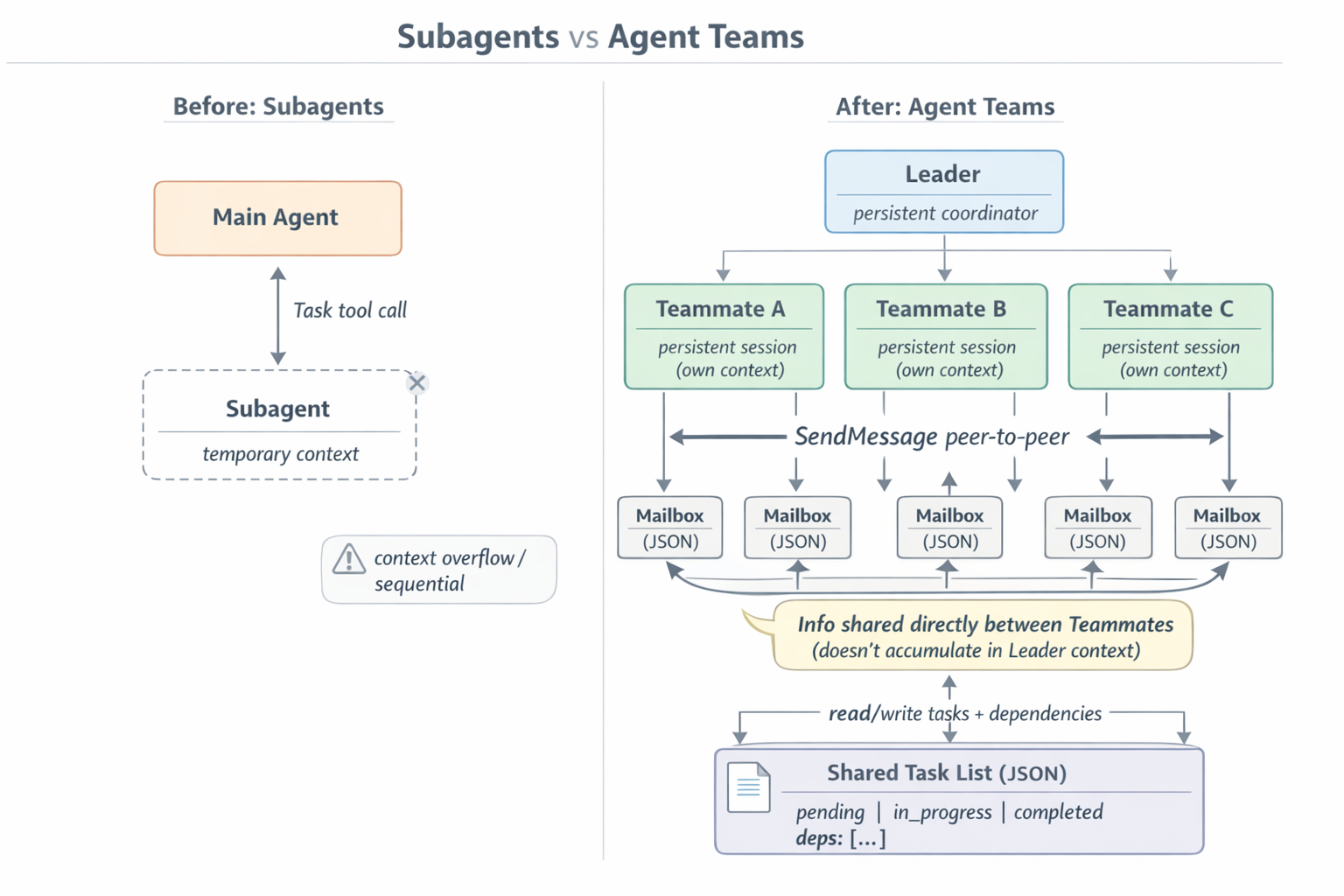
Fig. 1. Subagents vs Agent Teams — architectural comparison
So what’s different?
From the official docs:
Agent teams let you coordinate multiple Claude Code instances working together. One session acts as the team lead, coordinating work, assigning tasks, and synthesizing results. Teammates work independently, each in its own context window, and communicate directly with each other.
Fairly clear:
- team lead — your main Claude Code session,
- teammates — separate independent Claude Code sessions, each in its own context window,
- shared task list — with states, dependencies, and locks,
- mailbox — direct peer-to-peer message channels between agents.
The fundamental difference from subagents: a teammate doesn’t return a result and doesn’t die. It keeps living, it has a name, and its colleagues can reach out and ask it something. And without involving the leader — teammates can talk to each other directly.
You enable all of this with one line in ~/.claude/settings.json (the feature is experimental and off by default):
| |
Minimum Claude Code version: v2.1.32. After that you can tell the leader something like “Tonight we put on a show. The money is in hand. Shura! You’ll need to recite something from the declamation book, I’ll do the anti-religious card tricks, and Panikovsky…”
Anthropic recommends agent teams for:
- Research and review — multiple teammates simultaneously dig into different angles of a problem and then challenge each other’s findings. One looks at the code through the lens of security, another performance, a third test coverage. A single-pass review never achieves that breadth.
- Parallel module development — each teammate owns a subsystem without stepping on anyone else’s toes. Refactoring five modules simultaneously, for example.
- Debugging through competing hypotheses — interesting one. Five teammates get the same bug and each is given their own theory of the cause. They’re instructed not only to defend their hypothesis but to actively challenge the others. The theory that survives the crossfire is the root cause candidate. (Anthropic even shows this directly in the docs — “like a scientific debate.”)
- Cross-layer work — one teammate handles the frontend, another the backend, a third the tests, and they communicate: “Hey, I changed the API contract, here’s what you’re getting now.”
What you should not use a team for: sequential tasks with deep dependencies, edits to the same file, or small routine tasks. Coordination overhead will eat all the gains. Anthropic recommends three to five teammates for most tasks — more starts becoming counterproductive due to growing communication overhead.
Under the hood
But what we really want to know is how it works. Here’s what I found:
The gist:
~/.claude/
├── teams/
│   └── {team-name}/
│       ├── config.json                     # team config
│       └── inboxes/
│           ├── {agent-name}.json           # teammate's mailbox
│           └── {agent-name}.json.lock      # lockfile for concurrent access
└── tasks/
    └── {team-name}/
        └── {task-id}.json                  # one file per task
The team’s config.json contains a members array — name, agent ID, type, color (for UI rendering), assigned model, spawn prompt, operating mode. The leader updates this file every time someone joins, goes idle, or dies. The docs explicitly warn: don’t touch it manually, it’ll get overwritten.
Tasks live as separate JSON files with states pending / in_progress / completed, plus a dependencies field with a list of other task IDs. A pending task with unresolved dependencies can’t be picked up. When a dependency closes — the blocked task automatically unblocks. No manual unblocking required.
Claiming a task means writing the owner field in the JSON, protected by a lockfile. Two teammates can’t grab the same task simultaneously.
Claude Code also gained five new tools (some extending existing ones):
| Tool | Purpose |
|---|---|
TeamCreate | Spin up a team: create config.json, tasks/ directory, register the leader |
TeamDelete | Clean up: delete worktrees, configs, task list |
TaskCreate | Create a task as a JSON file (this is not the old Task tool — this is about todos) |
TaskUpdate | Change task status, owner, claims |
SendMessage | The “postman”: DMs, broadcasts, shutdown requests, plan-approval |
The old Task tool also got two new parameters — name and team_name. When passed, it stops being a factory for one-shot subagents and starts spawning a full teammate in team mode.
A teammate can be launched three ways — these are called backends:
In-process — the default. The teammate lives inside the same Claude Code process as the leader: its own context, its own message log, its own abort-controller (forced-stop mechanism — a “stop” button for a specific agent). Switch between teammates with Shift+Down in the terminal. Works everywhere, nothing to install.
tmux pane — the teammate launches as a separate claude process in a new tmux pane. Enabled via teammateMode: "tmux" in settings or the --teammate-mode tmux flag. Doesn’t work in the VS Code integrated terminal, Windows Terminal, or Ghostty.
iTerm2 — same thing, but via the it2 CLI and the iTerm2 Python API. macOS only.
The code below is what Claude Code generates and executes when the leader decides to spawn a teammate. You can see how the new process gets its identity: name, team membership, reference to the parent session. These flags tell the new agent that it’s part of a team and who its leader is.
| |
In tmux/iTerm2 mode, the teammate is a separate process with its own PID that communicates with the leader exclusively through the filesystem. In in-process mode they share one process, but the mailbox protocol is the same: JSON files with lockfiles.
How do our little friends communicate? Each teammate (let’s call them agents now) has a mailbox — physically a JSON file. The SendMessage tool appends a new record to the end of the file, something like:
| |
Fields:
from— sender name ("team-lead"or agent name),text— the message content (for regular messages — text; for protocol messages — serialized JSON, more on that below),summary— 5–10 word preview, used for UI rendering,timestamp— time in ISO 8601,color— the color assigned to the agent by the leader, so you don’t confuse who’s muttering in split-pane view,read— “read” flag. All new messages are written withread: false.
The lockfile and write atomicity
This is the interesting part — multiple agents can simultaneously send a message to the same recipient. If writes were naive, the last write would clobber everything before it. So each write operation does the following:
- Acquires an exclusive file lock on
{agent-name}.json.lock(standard OS mechanism — while one is writing, others wait, usingflock). - Reads the current JSON array of messages.
- Appends the new message.
- Writes everything back.
- Releases the flock.
If the inbox file doesn’t exist yet — it gets created as an empty array []. If the lockfile can’t be acquired — the write is deferred and retried. Readers also acquire flock when marking messages as read. This gives serialized access without any network queues.
How a message gets into conversation history
The recipient needs the message to somehow get into the LLM call. Just writing to a file doesn’t help the agent — the model doesn’t read that file itself. The message needs to be stuffed into the messages array for the next API call.
Each agent has its own execution loop — alternating “LLM call → tool call → tool result → next LLM call.” This is the classic tool-calling loop, like in any agent. Before each loop iteration, the runtime checks the agent’s mailbox (the JSON file) for unread messages.
If there are unread messages — they’re rendered to XML and injected into the conversation history. The renderer in Claude Code looks roughly like this:
| |
The message text gets wrapped in a <teammate_message> tag with teammate_id, color, summary attributes. This render becomes part of a user block, gets added to messages for the next model call, and the messages are marked as read under the same lockfile protocol.
From the model’s perspective this looks like just another piece of incoming context. It reads it, understands “ah, a colleague said something to me,” and reacts — either with a SendMessage reply, or by adjusting its work plan, or ignoring it if the content isn’t relevant.
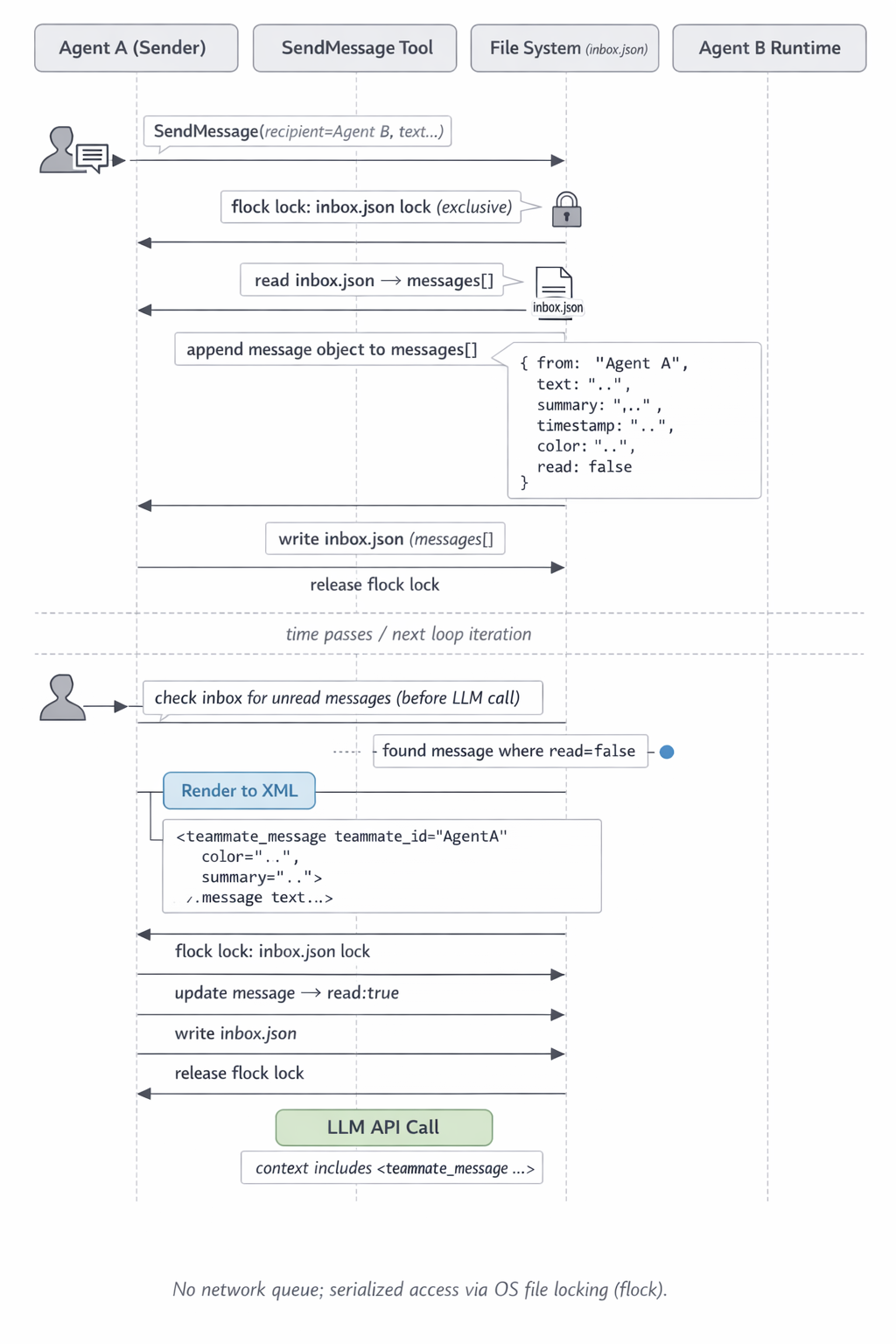
Fig. 2. Message path: from SendMessage to LLM call
Example — tracing a message
Say we have a problem. Users are reporting: when paying from two devices simultaneously, they get charged twice. Ostap spins up a team of three agents: balaganov@incident looks at the payment service, panikovsky@incident digs into the database, kozlevich@incident checks the retry logic on the frontend.
Step 1. Balaganov finds the root cause. His reasoning concludes: payment_handler.ts:112 has no transactional lock — two parallel requests both read the balance before the first one has written. Race condition. Panikovsky at this moment is actively writing a migration that adds an index to the payments table. If he runs it now — things will get worse. Balaganov decides to stop him.
Step 2. Balaganov calls the SendMessage tool:
| |
Step 3. The tool handler processes the call: acquires the lock on ~/.claude/teams/incident/inboxes/panikovsky.json.lock, reads the current array (one old message from the leader with the task), appends a new one with fields {from: "balaganov", text: "...", summary: "...", timestamp, color: "yellow", read: false}, writes the file back, releases the lock. Returns to Balaganov: "Message sent to panikovsky's inbox".
Step 4. Balaganov gets a successful tool result and continues — writes the fix for payment_handler.
Step 5. Panikovsky meanwhile is about to run db.migrate(). The runtime, before the next LLM call, checks his inbox. Sees the unread message from Balaganov. Renders to XML:
| |
This block gets added to messages for the current call. The message is marked read: true under the same lock.
Step 6. Panikovsky’s model receives the context with this XML injection. It “sees” the warning, defers the migration, replies to Balaganov via SendMessage (“got it, waiting for the fix — tell me when it’s safe”), and switches to another task from the list.
Step 7. Panikovsky’s reply goes the same way: written to balaganov.json under a lock, rendered to <teammate_message> on Balaganov’s next loop iteration, injected into his messages.
That’s the whole thing — a file, a lock, JSON, an XML tag in the prompt. A minimalist stack that nonetheless prevented Panikovsky from dropping an index on a live incident.
Protocol messages
Besides regular text messages, the same mailbox channel carries control traffic. Recognition is simple — the text field contains serialized JSON that gets parsed through Zod schemas (a TypeScript validation library: you describe the structure — it checks whether the incoming object matches). If the schema matches — it’s a control message, handled separately. If not — it’s plain text for the model.
Types of protocol messages:
shutdown_request/shutdown_approved/shutdown_rejected— the leader asks an agent to finish work. The agent can agree and terminate, or refuse with an explanation (“I’m not done yet”). A teammate that dies gracefully updates the team config before closing.idle_notification— the agent tells the leader it has finished all available tasks and is going idle. The leader sees this and can either assign a new task or start assembling the final response.task_completed— explicit notification of a specific task’s completion (with its ID and subject). This is a separate event from changing thestatusfield in the task file — it’s needed for UI synchronization and for unblocking dependencies.permission_request/permission_response— an agent asks permission for a potentially dangerous operation (running bash, writing to a file outside the worktree). The leader either approves or denies with updated permissions.plan_approval_request/plan_approval_response— if an agent is launched withplan_mode_required: true, it first writes a plan in read-only mode and sends it for approval. The leader either approves (allowing a switch to default mode), or rejects with reasoning (and the agent goes back to revise the plan).
These protocol messages bring order to the chaos — effectively implementing a state machine.
Hooks: where you can intercept
Beyond the protocol itself, Claude Code provides three special hooks for controlling team lifecycle:
TeammateIdle— fires when an agent goes idle (finished all tasks). If the hook returns exit code 2 — the agent doesn’t go to sleep but instead gets the feedback back and keeps working. Useful for checkpoints like “you said you’re done, but the tests aren’t green — here, go work.”TaskCreated— called when a new task is created. Exit code 2 blocks creation (with feedback). You can validate task format, require acceptance criteria, etc.TaskCompleted— called when a task is about to be closed. Exit code 2 prevents closure. You can hang test runs or linters here before considering a task done.
These are the explicit guardrails and quality gates I wrote about in my previous post — only now they’re not “NEVER do…” in a prompt, but a proper exit code 2 from a script.
Each agent has its own context
This is obvious of course. And its own mailbox. The task list is shared, but context windows are isolated. And when created, an agent doesn’t inherit the leader’s context.
What an agent gets at birth:
- its own system prompt (including
CLAUDE.mdfrom the working directory), - connected MCP servers,
- available skills,
- spawn prompt from the leader (task, context, instructions).
This means agents can’t rely on each other’s work. If the security agent found a critical issue — the coder agent won’t know about it unless security explicitly sends a SendMessage. The mere fact that a colleague found something is unknown to anyone but them. That’s why good team prompts include phrases like “share findings via messages, challenge each other’s approaches.”
For example:
Users report the app exits after one message instead of staying connected.
Spawn 5 agent teammates to investigate different hypotheses. Have them talk to
each other to try to disprove each other's theories, like a scientific
debate. Update the findings doc with whatever consensus emerges.
One downside: token consumption. A teammate’s full context is counted separately from the leader’s. A team of a leader and three teammates at 10K tokens each is 40K tokens at startup instead of the 10K you’d have in a solo session.
Debugging
As always — agents get confused, send each other the wrong things, fall idle with open tasks, and so on. This is all experimental, and Anthropic is honest about that.
Ways to see what’s happening:
- In split-pane mode each agent is in its own tmux pane. You can watch the live stream of consciousness. You can even take control and tell a teammate directly: “Stop jumping around files, look at this specific function first.”
- In in-process mode
Shift+Downcycles focus between teammates.Enterdives into a specific teammate’s session.Escapeinterrupts their current turn. - Ctrl+T toggles the task list — see who’s doing what, what’s deferred, what’s blocked.
- Files on disk —
cat ~/.claude/teams/{team}/inboxes/{name}.json | jqlets you read the correspondence. And~/.claude/tasks/{team}/— the real task statuses. If something is stuck, it’s often visible right in the file.
Common pitfalls and workarounds:
- The leader starts implementing without waiting for agents — happens often. Fix with a prompt like: “Wait for your teammates to complete their tasks before proceeding.”
- An agent went idle without marking its task complete — its dependents stay blocked. Beware silent tasks. Fix: either manual
taskUpdateor tell the leader “check incomplete tasks and close the ones actually done.” - The leader decided the team finished when work isn’t actually done — just say “keep going, the sun hasn’t set yet.”
/resumeafter a restart doesn’t restore in-process agents. The leader might try writing to “dead” agents. Fix: “create new agents, the old ones are gone.”- Permission prompts are annoying — all permission requests from agents bubble up to the leader, and if you haven’t configured
permissionsin settings, you’ll get an endless stream of questions. Solution: pre-approve routine operations in permission settings.
And most importantly — don’t leave the crew unattended for long. The leader is your main session and you talk to it normally: just type “what’s our status” in the terminal. Better to check in occasionally than to discover three agents have been debating something among themselves since lunch.
What’s missing
Here’s what I’ve found so far:
- One leader, one team at a time. You can’t create a new one until the current work is done.
- Agents can’t create their own agents. The hierarchy is flat: leader — teammate. Recursion would be nice.
- You can’t transfer leadership.
How this compares to Copilot Custom Agents
Copilot agents are the direct equivalent of the old Task tool subagents from Claude Code. The main agent creates a child agent via the agent/runSubagent tool with its own context window. It does something — and returns a result.
Since 1.107 (December 2025) subagents can run in parallel. Since 1.116, in the Agent Sessions view they became more visible, and you can expand a specific subagent to see its full prompt and result.
But they don’t talk to each other. They don’t communicate at all. The parent agent coordinates by synthesizing results after everyone returns. What Claude Code could do from the start.
Agent Sessions view (multi-agent dashboard)
This is where Microsoft went strategically — consolidating all agent types in one VS Code window: Local Agent (Copilot, regular session), Background Agent (background task), Cloud Agent (runs on GitHub servers, for long-running things), Codex Agent (haven’t tried it). You can see what’s running where, switch between them, delegate. But again — this isn’t about inter-agent coordination — it’s about how a human organizes their work across multiple agents.
Agent Debug Logs (debugging past sessions)
Available since 1.116. Under the github.copilot.chat.agentDebugLog.fileLogging.enabled flag, Copilot writes a chronological log of all session events to disk: requests, model responses, tool calls, results. Previously you could only see the current session — now it’s saved locally and you can open old ones.
Where they fundamentally diverge
In brief:
| Aspect | Claude Code Agent Teams | Copilot Agents |
|---|---|---|
| Architecture | Leader + agents with shared task list and mailboxes | Coordinator/subagent or handoff chain (one finishes → passes to next) |
| Inter-agent communication | Directly between agents via JSON mailboxes + XML injection into conversation history | Only through returning result to parent |
| Parallelism | Multiple agents working simultaneously and exchanging messages | Parallel subagents without exchange; or sequential handoff chain |
| Coordination | Decentralized: agents self-assign tasks, set dependencies | Centralized: parent agent distributes and synthesizes |
| Visibility | tmux panes + Shift+Down navigation | Agent Sessions view with expandable subagent blocks |
| Debugging past sessions | Through files in ~/.claude/teams/ and ~/.claude/tasks/ | Agent Debug Logs (1.116+) |
| Leader lifetime | Persistent, until team is deleted | Created and dies for subagents; persistent for parent |
| Can agents create agents | No, flat hierarchy | Also no (subagents can’t create their own subagents) |
If you try to find the philosophy behind this table, it comes out like this. Anthropic bets on distributed coordination: the leader sets the direction, then agents can self-organize, exchange, challenge each other — without mandatory routing through the leader. Microsoft bets on controlled workflow: every step through a human or parent agent, a state graph with explicit checkpoints.
Choose accordingly.
Sources and further reading
- Orchestrate teams of Claude Code sessions — official documentation
- I reverse engineered how Agent Teams works under the hood — vicdotso on the internals
- Full gist with the actual protocol code — reverse-engineered tools and mailbox
- Addy Osmani: Claude Code agent teams — notes on peer-to-peer and context isolation
- VS Code 1.116 release notes — Agent Debug Logs
- Subagents in Visual Studio Code — Copilot subagents
- Custom agents in VS Code — .agent.md and handoffs
- Your Home for Multi-Agent Development — VS Code multi-agent strategy