Agents, Agents Everywhere…
Our icons are the prettiest (c)
Preface: why bother?
As you know, in IT there’s no such thing as “doing nothing.” We call it “researching.” That’s the moment when, barely awake before standup, you frantically try to come up with a justification for yesterday’s idleness in a matter of seconds.
But even your research might need some artifacts you can present while insisting you’ve been working on it day and night. Not to mention perfectly pragmatic tasks — exploring new topics and terms to impress people and boost your authority (and hang on to that contract in these grim times).
So laziness should help minimize the effort here too — googling like the old days, stuffing your head with tons of not-so-relevant information, carefully copying the most important points into a notebook — that’s already too much work. And inevitably you arrive at the conclusion that you’ve wasted most of your time sifting through mountains of irrelevant, often outdated info. So why not call our little agent friends to do it all for you?
The goal:
- Quality research — the freshest, most current, most relevant stuff
- Summarize it into the most concise and punchy bullet points possible (we humans have a context window that overloads quickly too)
- Ideally accompany it with nice illustrations and diagrams (visual comprehension of concepts is so much easier)
By the way — everything below assumes Copilot agents and applies only to them.
Let’s not repeat ourselves — the previous post covered the basics of working with agents. We remember the problems — context rot, keep it minimal, agents know only what they need and somehow communicate.
The task is to squeeze the maximum out of this architecture — and to test what it’s actually capable of with the models available to us. Maybe the whole idea isn’t worth the effort. Although —
- We’re solving the problem of finding the most relevant information — sure, models can search on their own with web_fetch, but the idea is to use Tavily (more relevant, cleaner), various MCPs like GitHub/Hugging Face/Context7, etc. — especially when we need implementation details.
- Let’s try to do something with the results — process them to extract the most useful stuff and discard marketing fluff and noise.
- Wrap it all up in a final document — maximally concise coverage of the research subject (preferably hallucination-free), with quality illustrations.
So here’s what we’ve got:
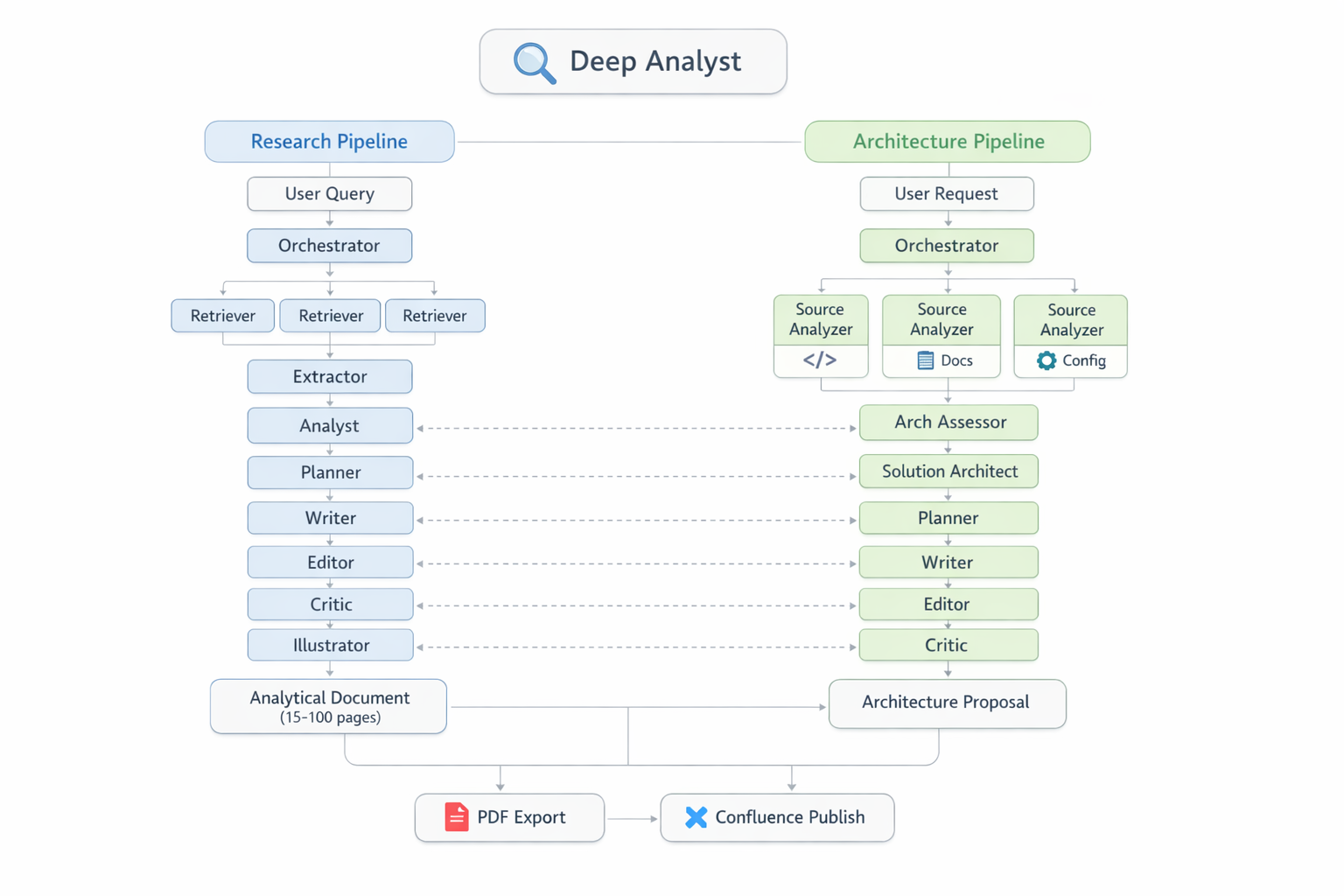 Platform overview: two independent pipelines (Research and Architecture), 16 agents, two Python state machines, and the PaperBanana illustration generation system
This is a story about several architecture versions, hard-won lessons, and one colon character that brought down the entire pipeline.
Evolution
Version One: “You’re Smart, Figure It Out”
We won’t even consider this — a single agent. Because one agent trying to simultaneously search, read, analyze, and write is like sending one guy to buy champagne, shop at the market, and cook dinner all at once.
Version Two: “Let Them Talk”
Split into roles: Scout searches, Extractor extracts, Analyst analyzes. Each knows its job. Problem: how do they communicate? Through sub-agent return messages — text for humans, not structured data. Through files. Through prompts. Through hopes and prayers.
Version Three: “They’ll Handle It Themselves”
Spoiler: they didn’t. Each agent wrote files in its own format. Retriever saved URLs as - URL: https://..., while the parser expected 1. https://.... One agent couldn’t read what another had written. The Tower of Babel, but instead of languages — markdown formats.
Version Four: “Convention over Orchestration”
Files = protocol. Folders = routing. Each agent knows: read from here, write to there. Things got better. But agents still deviated from instructions, ignored logging, invented their own formats.
Version 4.3: “Script Is the Brain, Agent Is the Hands”
Eventually I decided that pipeline determinism can only be reliably guaranteed by code. That’s how the Dispatcher was born — a Python script, the single source of truth across the entire factory. A stateless state machine. The Dispatcher determines phase ordering, prompt contents, validation rules, retry logic, and logging. It’s launched by the orchestrator agent — which calls the Dispatcher, receives instructions, and executes them.
Here’s what the final pipeline looks like — ten phases, from topic decomposition to a finished document with illustrations:
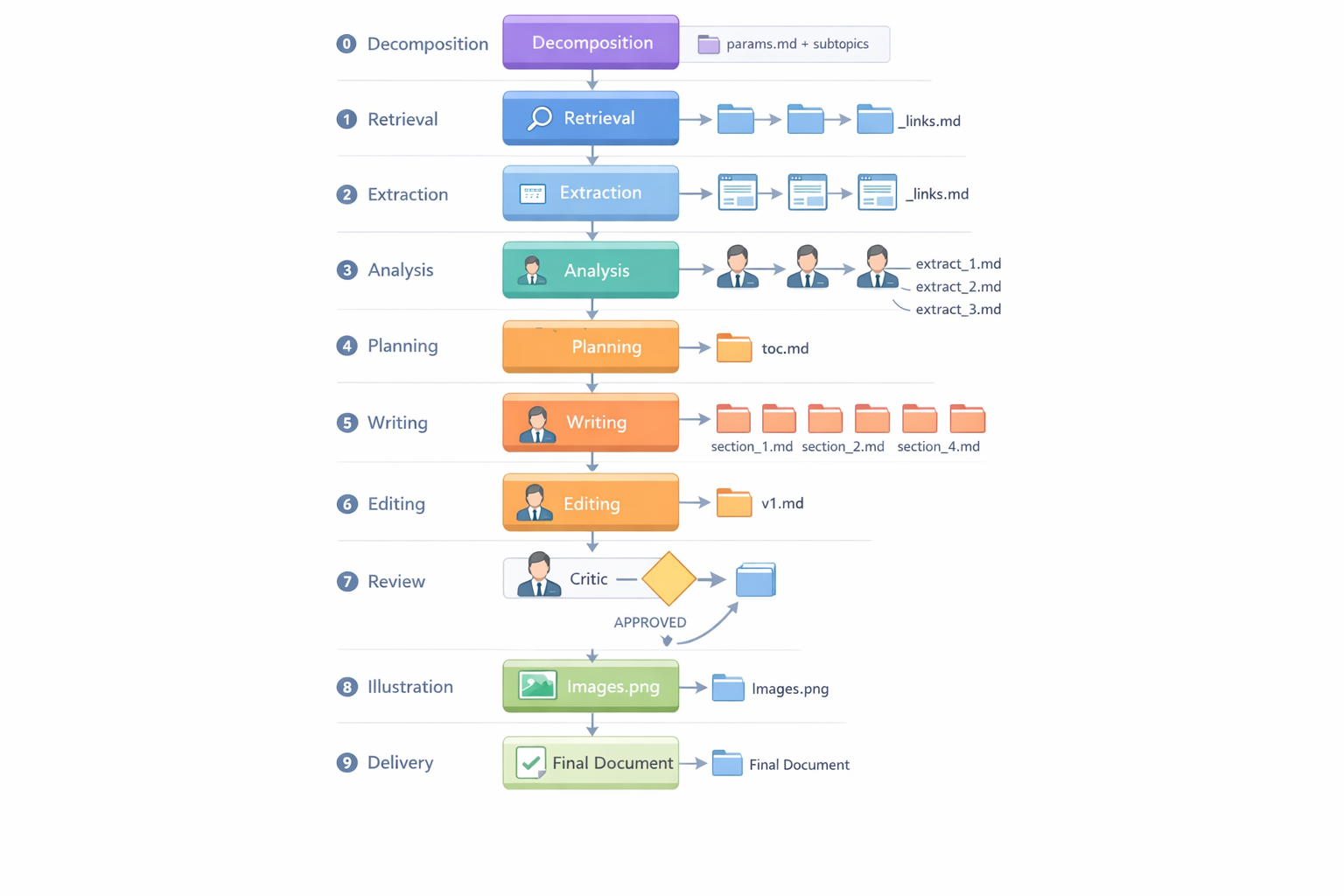 Research pipeline: 10 phases from topic decomposition (Phase 0) to delivery of the final illustrated document (Phase 9). Plus optional extras — PDF conversion, Confluence publishing
Speaking of diagrams and illustrations — this was painful. The top models (I consider Anthropic’s the best) could more or less handle simple Mermaid and PlantUML. draw.io was hopeless — even with XML examples, only the simplest diagrams could be crudely generated. In short, it was all bad. But then PaperBanana came out — https://github.com/llmsresearch/paperbanana — an open-source framework and various forks thereof. It’s not just a wrapper over image APIs. It’s a full-fledged multi-agent pipeline of 6 agents — a pipeline inside a pipeline, if you will:
- Retriever — selects relevant diagram examples from a curated collection (13 reference styles)
- Planner — generates a detailed textual description of the future diagram based on examples
- Stylist — adjusts the description to visual guidelines (palette, layout, fonts)
- Visualizer — renders the description to PNG via
gpt-image-1.5 - Critic — evaluates the result, provides feedback
- Steps 4–5 repeat iteratively (3 rounds by default)
For testing the illustration pipeline, we chose the topic “The Life of the Belarusian Beaver in Space and Time” — just for fun. I think it turned out pretty well:
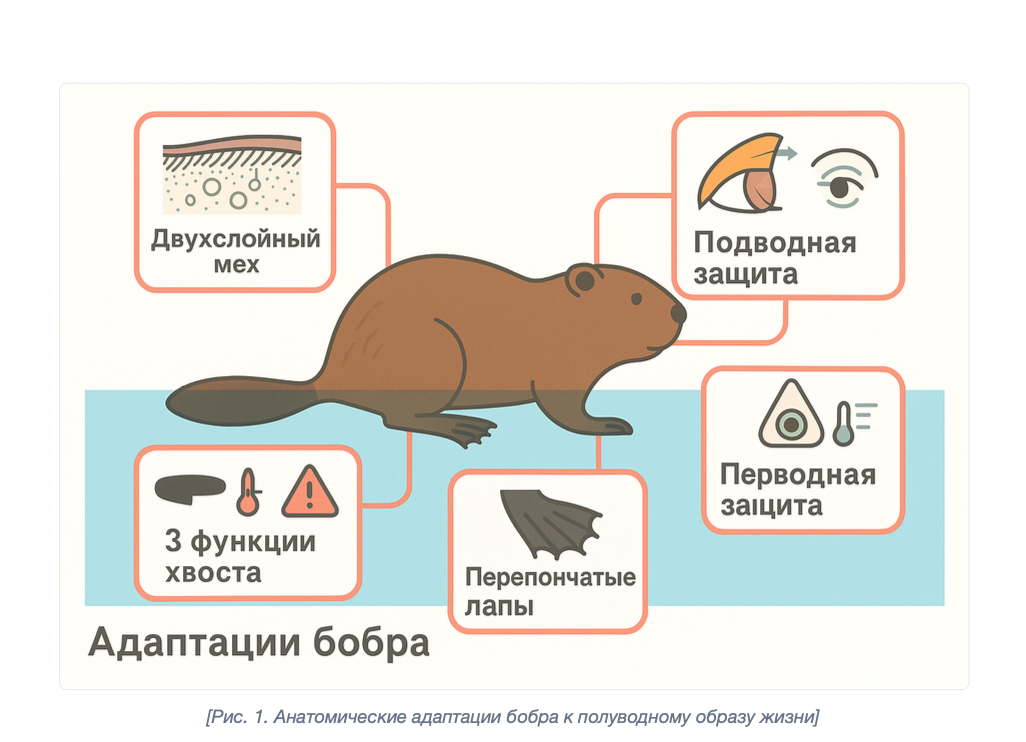 Anatomical adaptations of the beaver to semi-aquatic life — generated by PaperBanana
Hard-Won Lessons
“I Saved It!” — No, You Didn’t
The first discovery that cost me two days: sub-agents launched via runSubagent unreliably work with tools. At the time of development (February 2026), they couldn’t write files or call MCP tools — the agent generated text that looked like a create_file or tavily_search call, but these were hallucinations: JSON blocks, correct structure, but nothing actually executed. Files never appeared on disk, search results were fabricated.
Important nuance: the platform evolves rapidly. In March 2026, a recheck showed that create_file and fetch_webpage already work for sub-agents. But I wouldn’t trust it unconditionally — behavior may change again with the next VS Code or model update. Or maybe I just didn’t understand something.
Architectural takeaway: Centralizing I/O through the orchestrator — not because sub-agents “can’t,” but because it’s easier to control and validate. The orchestrator sees the entire flow, can verify output before writing, log it, retry if needed. When each sub-agent writes files on its own, you lose that control point. But let’s be honest: this is a design choice, not a forced constraint.
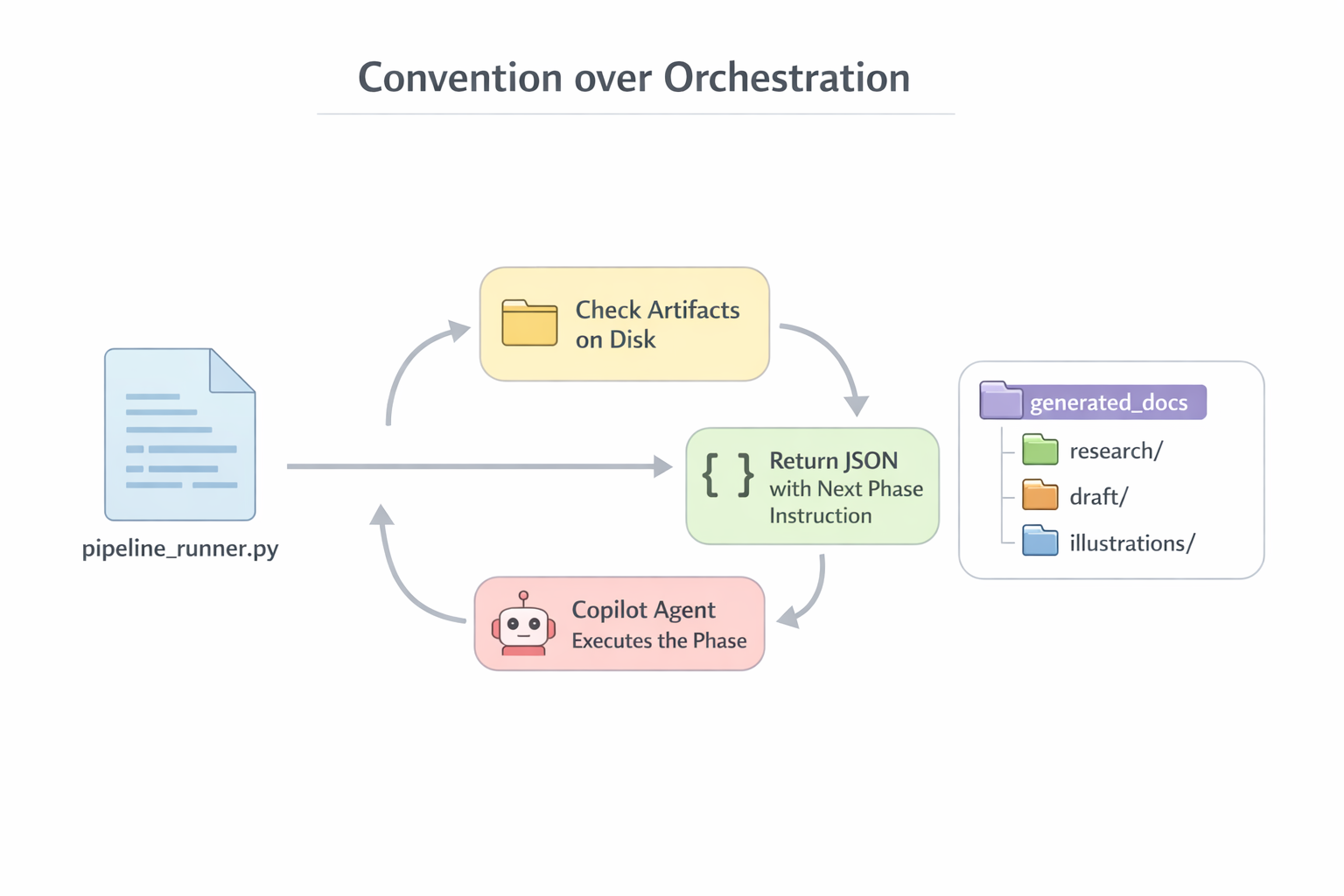 Deterministic orchestration: the Dispatcher decides “what to do,” the executor agent “does it.” Sub-agents only return text, all I/O goes through the orchestrator
Progressive Amnesia
The context window — let’s say 200K tokens. Sounds like a lot. In practice — imagine a conveyor belt of fixed length. Every tool call — both request and response — lands on the belt and stays forever. Can’t delete. Can’t compress. By the seventh phase out of ten, the belt is packed to the brim, and your brilliant engineer starts forgetting why he’s here.
The degradation isn’t sudden. First the agent stops logging (logging instructions are at the end of the prompt, and it can no longer “see” the end). Then it starts confusing file formats. Then it forgets style constraints. And finally it just cuts off mid-sentence and dies without informing you of anything.
Incident Catalog: Greatest Hits
Hallucination: “FDA Instead of Copilot”
Phase 5, section writing. The Writer sub-agent receives a prompt: “write a section about the agent loop architecture of GitHub Copilot.” The prompt contains paths to extract files — the ones with the collected research. But paths aren’t content. To read them, the sub-agent must call read_file itself. And we remember from the section above: sub-agents unreliably work with tools.
What happens when the model doesn’t receive grounding data and doesn’t read sources? It falls back to training data and confidently generates text on an arbitrary topic. In our case — 1,070 lines about a “Tamper-Proof Clinical-Trial Document Integrity System” featuring the FDA (the American medical regulator!), W3C, Apache Tika, and SHA-3-256. In a confident academic tone. With tables. With pseudocode. Not a single word about GitHub Copilot.
It’s as if you asked a chef to make borscht, and he handed you a dissertation on quantum physics. With a peer review. In French formatting.
Solution: check_relevance() — a check that at least 30% of the topic’s keywords appear in the output. If not — retry with a warning “CRITICAL: Stay on topic.” Kindergarten stuff? Exactly. But it works. In later versions, extract content was embedded directly into the prompt — instead of relying on the sub-agent to go read it on its own.
The Colon of Doom
How does the pipeline know what to research? Through params.md — a markdown file the Orchestrator generates from the user’s request. It’s the entry point of the entire pipeline: research topic, language, target audience, page budget, writing style. The Dispatcher parses this file and distributes parameters to each phase. Simple format: - **Key:** value.
Here’s the thing. The parsing regex expected the colon OUTSIDE the asterisks: **Key**: value. But the agent filling the template put the colon INSIDE: **Key:** value. One character — and all parameters returned defaults. Topic “Research” instead of the actual one. Budget “25 pages” instead of the specified 15. The pipeline dutifully generated 25 pages about “Research” — and you didn’t even immediately realize something was wrong.
Lesson: One character can break the entire pipeline. Regex parsers are critical infrastructure, and they need tests.
The Infinite URL Validation Loop
count_urls() counted links via re.findall(r'https?://', text). But fetch_webpage sometimes returned file:// URIs. The parser didn’t see them → considered the file empty → sent it for retry → retry found the same URLs → parser still didn’t see them → and round and round. 15 minutes, 4+ manual interventions. An elegant URL-matching regex — and your pipeline is spinning its gears in neutral.
Double Write: How the Pipeline Devoured Its Own Memory
This is the main architectural bug, discovered after three runs.
Here’s how it works: the orchestrator calls fetch_webpage("https://docs.github.com/...") and receives 5K characters of content. The content goes into history. Then the orchestrator calls create_file("extract_1.md", same_content). The same content goes into history a second time. Not a file reference, not a hash — a full copy.
The scale of the disaster:
- Phase 2 (extraction): 30 URLs × 5.7K average × 2 = ~340K characters of duplicates
- Phase 5 (writing): 8 sections × 9K average × 2 = ~144K
- Phase 6 (merge): 71K × 2 = ~142K
- Total: ~411K characters — half the context — pure duplicates
It’s as if every part on your conveyor belt went through the machine twice: once for real, and once as a ghost part that still takes up space on the belt.
The solution is obvious but requires changes: move heavy operations into separate Python scripts that handle I/O on their own and return a single line to the orchestrator: “✓ done, 4200 words.” Instead of 5K characters in context — 30 characters.
Confident Inaccuracy: Hallucinations at Work
An LLM never says “I don’t know.” Never. Instead, it:
-
Invents plausible CLI flags.
claude --headless --prompt— sounds reasonable, looks right. But the correct flag isclaude -p. And--headlessdoesn’t exist. -
Confuses similar but different things. Subagents (Agent tool, hub-and-spoke) and Agent Teams (TeammateTool, mesh) — two completely different mechanisms. The agent confidently described one while naming the other. With a comparison table. With code examples. All lies.
-
Generates tables with confident tone and false data. “web_search,” “notebook_edit” — no such tools exist in any of the frameworks being studied. But the table looked convincing. I’d have believed it myself, if I hadn’t gone and checked the source code.
The only defense — cross-referencing with primary sources. Source code. CLI --help. Official documentation. Everything else is a potential hallucination, even if written confidently, with structure, and with code blocks.
Loss of Procedural Knowledge, or Agent Amnesia
Here’s a drama in three acts.
Act 1: Phases 1–7 completed. Five of six illustrations generated with the correct command: paperbanana_generate.py --direct "description" "output.png". The agent knows the wrapper script, the provider name, the invocation format. Everything works.
Act 2: Context overflows. The conversation breaks off. The user starts a new session.
Act 3: The new agent is literally the same brilliant engineer, but with total amnesia. It doesn’t remember the wrapper. It tries calling paperbanana.cli --direct — the --direct flag doesn’t exist in the raw CLI. Error. Tries --provider openai — needs openai_imagen. Error. --vlm-provider google — needs a Google API key, which doesn’t exist. Error. Five attempts before a working variant was found by trial and error.
One illustration. Five attempts. Because the context window isn’t just a text limit. It’s your worker’s entire working memory. Restart the conversation — wipe everything.
Nine Principles, Learned the Hard Way
Over five versions and a couple dozen runs, these principles crystallized — still relevant today.
1. Code, Not “Instructions”
If something must execute reliably — it belongs in code, not in a prompt. The agent will ignore instructions — it’s a matter of when, not if. Logging? Python logging. Phase ordering? The Dispatcher. File formats? Regex parsers. Retry logic? can_retry() with persistence. The word “must” is a polite suggestion to an agent.
2. Sub-agent = Text Generator (by Design)
Sub-agents can call tools — create_file, fetch_webpage already work. But we deliberately restrict them to text generation. The prompt says “RETURN as markdown,” not “write to file.” Why? The orchestrator sees the entire flow, validates output before writing, logs it, retries. When each sub-agent writes files on its own — you lose that control point. Also: every tool call by a sub-agent eats tokens in the orchestrator’s context. Fewer tool calls inside the sub-agent means more context left for useful work.
3. Files = Protocol
The only reliable channel between agents — files on disk with a fixed format. _links.md — a numbered list of URLs. extract_*.md — header + body. toc.md — ## NN. Title — Pages: N — Sources: path. Everything parsed by a single regex. Everything predictable.
4. Validate After Every Phase
Empty output from one phase = garbage for all subsequent ones. The script checks: files exist, word count is within range, URL count is sufficient, content is relevant. Without this, your pipeline produces defects, and you only find out at final inspection.
5. Parallelism Through Isolation
One subtopic = one folder = one agent. Race conditions are impossible if everyone writes to their own space. Retry of one phase doesn’t trigger the next one in parallel. Simple, boring, works.
6. Not Crash, but Graceful Degradation
A subtopic with no extracts — skip it. Writer produced garbage — retry. ToC doesn’t parse — retry with format hint. Two revisions didn’t help — accept as is. Illustration failed to generate — document goes without it. The factory manager doesn’t panic when a machine breaks down. He reroutes the flow and continues.
7. One Regex Can Break Everything
Parsers are critical infrastructure. A colon inside bold text, file:// instead of https://, a space before a marker — each of these cases blocked the pipeline. Tests for parsers aren’t a luxury.
8. The Context Window Is a Physical Constraint
It’s not a bug. Not a workaround. It’s a fundamental physical limitation, like the size of the shop floor in your factory. The floor fits a certain number of machines — and that’s it, you can’t push the walls out.
VS Code Copilot Chat operates on an “append-only history” model. Every tool call — request and response — goes into history and stays forever. Can’t delete. Can’t compress. Claude Sonnet’s context window is ~200K tokens. Sounds enormous. Here’s how it fills up on a real run of a 15-page document:
- Baseline (system prompt, agent config, memory): ~8K — haven’t even started working, and 4% is already used up.
- Phase 1 (URL search): +7K — tolerable.
- Phase 2 (content extraction): +70K — and this is where the fun begins. 30 URLs, each downloaded via
fetch_webpage, each saved viacreate_file. The same data — twice in context. - Phases 3–5 (analysis, planning, writing): +60K — sub-agents return text, orchestrator writes files. Double portion again.
- Phase 6 (merge): +38K — Editor assembles the document from sections. 71K characters of content + 71K in create_file = duplicate.
- Phases 7–9 (review, illustrations): +11K — small stuff, but we’re already at the limit.
Total: ~197K out of 200K. The pipeline limps to the finish on the last drops of context, like a car pulling into a gas station with the fuel light on.
And here’s the key point. Degradation begins long before the limit. At 50K+, the agent reasons worse. At 100K+, it starts “forgetting” instructions from the beginning of the prompt. At 150K+, it skips mandatory steps and confuses files. It’s not a cliff — it’s a gradual fade, like a light on a dimmer. And you don’t immediately notice the light has grown dimmer.
A 10-phase pipeline doesn’t fit in a single session — that’s physics. Session boundaries are just as mandatory a design element as walls between departments in a factory. Fortunately, the Dispatcher is a stateless state machine: it determines the current phase from files on disk, not from memory. Restart the conversation, call next — the Dispatcher looks at the belt and immediately knows what to do next.
But splitting alone isn’t enough. You also need to reduce context consumption within each session. The main culprit — double write: the orchestrator receives data (fetch_webpage / runSubagent return) and immediately passes the same data to create_file. Identical content — twice in history. This consumes ~110K tokens — more than half the budget. Solution: move heavy operations into Python scripts that handle I/O themselves and return a single line to the orchestrator: “✓ extract_1.md — 4200 words.” Instead of 5K characters in context — 30.
9. Procedural Knowledge Is Volatile
Everything the agent “learned” during work — exact CLI commands, workarounds, provider names — evaporates when the session restarts. Critical recipes must be stored in files, but that’s obvious.
Instead of a Conclusion
Does it work? More or less. The last run — a 15-page document with six illustrations, reviewed and approved. Without manually writing a single paragraph.
But — the context still overflows sometimes. Agents still hallucinate. Regex still breaks on unexpected formats. But every run is data. Every incident is a principle. Every principle is a line in the Dispatcher.
And that, perhaps, is the main lesson: managing a factory of Iron Dummies isn’t about “ask and receive.” It’s engineering discipline. With tests, validation, retry logic, session boundaries, and paranoid instructions.
And if you’re curious to dig in — the repository is open.