Agentic AI: the agent engineer’s stack
This piece grew out of the job ads for agentic Python engineers - those requirement lists where PydanticAI/CrewAI/LangGraph, MCP/A2A, evaluation frameworks and vector databases all sit next to each other. I keep running into them, and I’ve noticed that most candidates are hopelessly lost in these questions. Even the prospect of switching to manual labour in the near future doesn’t seem to motivate them to pick up the skills, and there really isn’t that much to pick up. Sure, there is a category of geniuses who mostly live in anonymous comment threads, but I’m talking about ordinary earthly people, the ones I actually meet, and they are who this is written for. So, dear nobody-in-particular, this should help you get through the interview and keep yourself fed for a while longer in these lean times.
And let’s not forget: everything moves fast these days, so these notes will go stale soon enough.
What an agent actually is
Let’s start with a definition. Not a textbook one, ideally, but one you can actually hold in your head.
First approximation: it’s a thing with a prompt, an LLM and some tools in it. But that’s not enough - by that description any script with a single model call is an agent. Two more pieces are needed.
The first is the loop. Not a chain of the form prompt → model → parsing → model → answer, where you laid out the route in advance. In a loop the model picks the next step itself: it thinks, decides to call a tool, gets the result, thinks again.
The second is feedback. The model sees what came out of its action and decides what to do next based on that. If the result never comes back, what you have is not an agent but a plan generator.
Hence the main difference: in a chain you program the sequence of steps, in an agent you program a set of capabilities and a goal, and the sequence emerges as it goes.
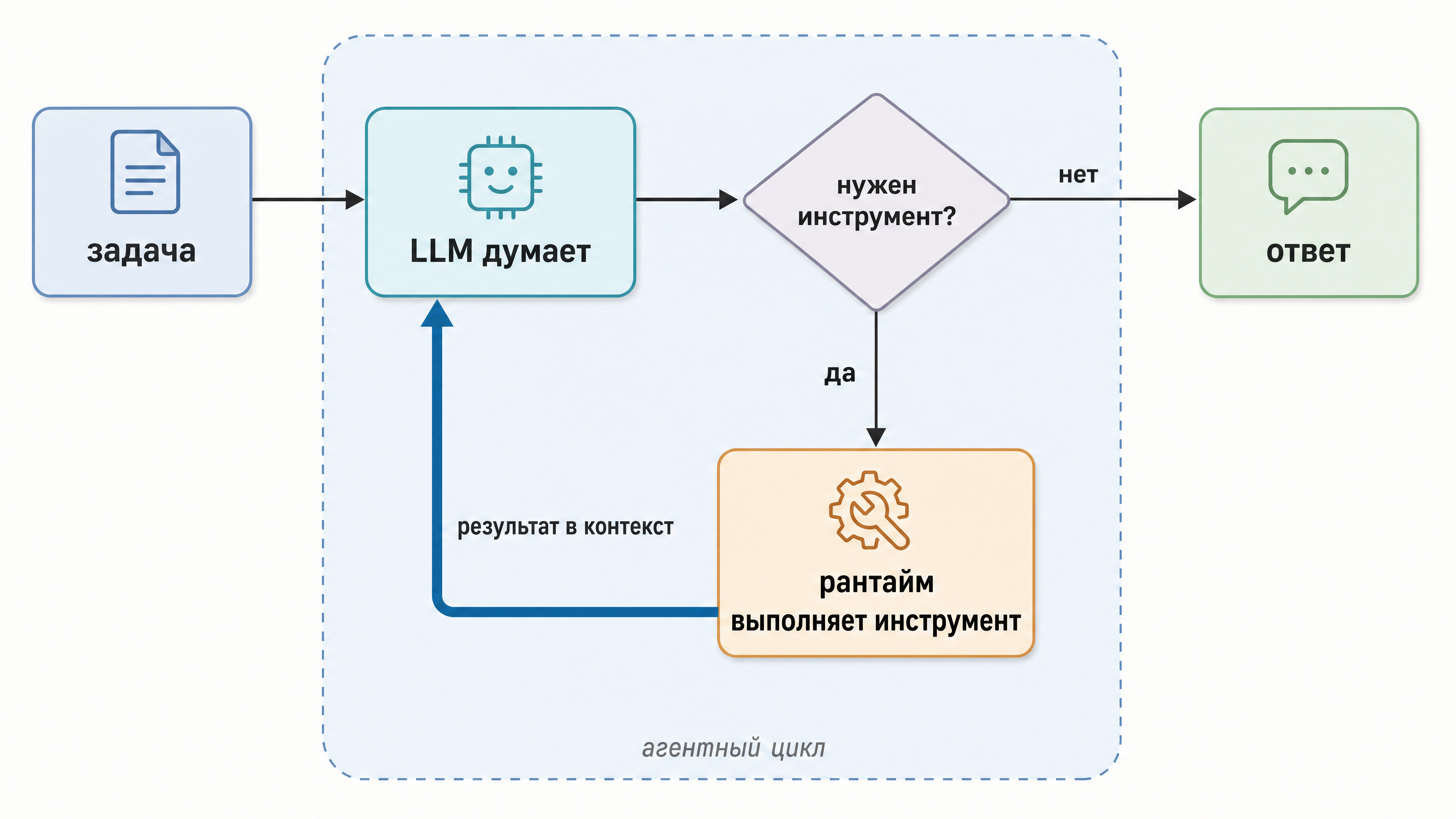 Fig. 1. An agent is a model in a loop with tools. In a chain the route is fixed in advance; here the model decides what to do next on every turn.
The loop is simple enough. Tools are declared as schemas at the API level: name, description, JSON Schema for the arguments. Modern models are specifically trained for this format. It’s the normal mode of operation, not an attempt to talk the model into replying with JSON. The model then answers either with text or with a tool call: “call this tool with these arguments”. The model itself does nothing, it only asks. The runtime does the asking part: it also puts the result back into the context, keeps the history and wakes the model up again.
The loop runs until a stop condition fires. Ideally the model decides the task is done and answers with plain text, no tool call. But there are other things in play: iteration limits, token budgets, unhandled tool errors and the “cancel” button. Essentially all of Agentic AI stands on this scheme, and all the complexity is around it: how to describe tools so the model understands them, what to do about looping, where to keep state. And how to figure out afterwards where exactly the agent went wrong.
One more thing for the sake of precision, to kill the “either a chain or an agent” fork. These are two extremes with intermediate forms in between: routing, where the model picks the branch but you define the branches; an orchestrator with workers; a chain where only one step is agentic. The further along that scale, the more freedom the model has. And correspondingly fewer guarantees. More on that below, in the section on frameworks.
The moral: an agent is justified where the route depends on the data and cannot be predicted - research, debugging, multi-step work with an unknown number of steps. The price of an agent is tokens and unpredictability.
PydanticAI: an agent by contract
Among the agentic frameworks, PydanticAI is currently the most pythonic way to assemble an agent. It comes from the Pydantic team, and its philosophy is the same as the library’s: if you declared a type, the framework will make sure the data matches it.
Here’s what a baby agent looks like:
| |
A picky reader will of course ask: “we’ve seen this exact weather example in a million agent tutorials, again?”. Yes, the example is nearly the same, but there are a couple of useful details in it. Let’s go through them point by point, because every one of them comes back later in evaluation.
First, output_type. We declared that the agent’s answer is a Pydantic model (WeatherAnswer). The framework turns it into a JSON schema, hands it to the model as the response format, and then validates whatever comes back. If it doesn’t match the schema, you don’t get broken JSON: the agent returns the validation error to the model and asks it to try again. That’s how structured output actually works - validation with retries. No rewriting the prompt while begging for the right format.
Second, tools. The agent.tool and agent.tool_plain decorators turn an ordinary function into a tool: the argument schema is built from type annotations, the description from the docstring (which is why the docstring in the example matters - the model reads it when choosing a tool). Argument types are validated too, so the model can’t pass a string where a float belongs. The difference between the two decorators is one thing: tool passes RunContext as the first parameter, an object holding the context of the current run, while tool_plain gets only the arguments from the model and the function stays self-contained.
Third, dependencies, and this is where it becomes clear what RunContext is for. The main thing in it is ctx.deps, the run’s dependencies. It works like this: when creating the agent you declare their type with deps_type - a DB client, a config, a user session, all in one object; at run time you pass a concrete instance: agent.run_sync("…", deps=…). A tool declared with tool pulls that instance out of ctx.deps, while a tool_plain tool has no such access and has to get whatever it needs through globals and imports. RunContext also holds the current retry number, the message history and a token counter, but those are details. The point is that this is dependency injection: in tests you slip in a fake client, in production the real one, and the tool code doesn’t change. This pays off when we get to evaluation below - running an agent over a dataset almost always happens with substituted dependencies.
Fourth, output validators. On top of the schema you can hang your own checks (output_validator): say, “temperature between -90 and +60, otherwise ask again”. The model gets the error text and corrects itself.
Fifth, everything else in brief: streaming output (run_stream), token accounting (result.usage()), model agnosticism (OpenAI, Anthropic, Gemini, local models through OpenAI-compatible APIs), support for MCP servers as a source of tools, Logfire for observability (a wrapper over OpenTelemetry - it comes up in the last section), and pydantic-graph, declarative step graphs for when the agent loop has to be embedded into a rigid route.
How PydanticAI differs from what you’d write by hand: it doesn’t hide the loop from you, it types everything that flows through it. Prompt, tools, dependencies, output - types everywhere, and the broken bits get caught by validation before production.
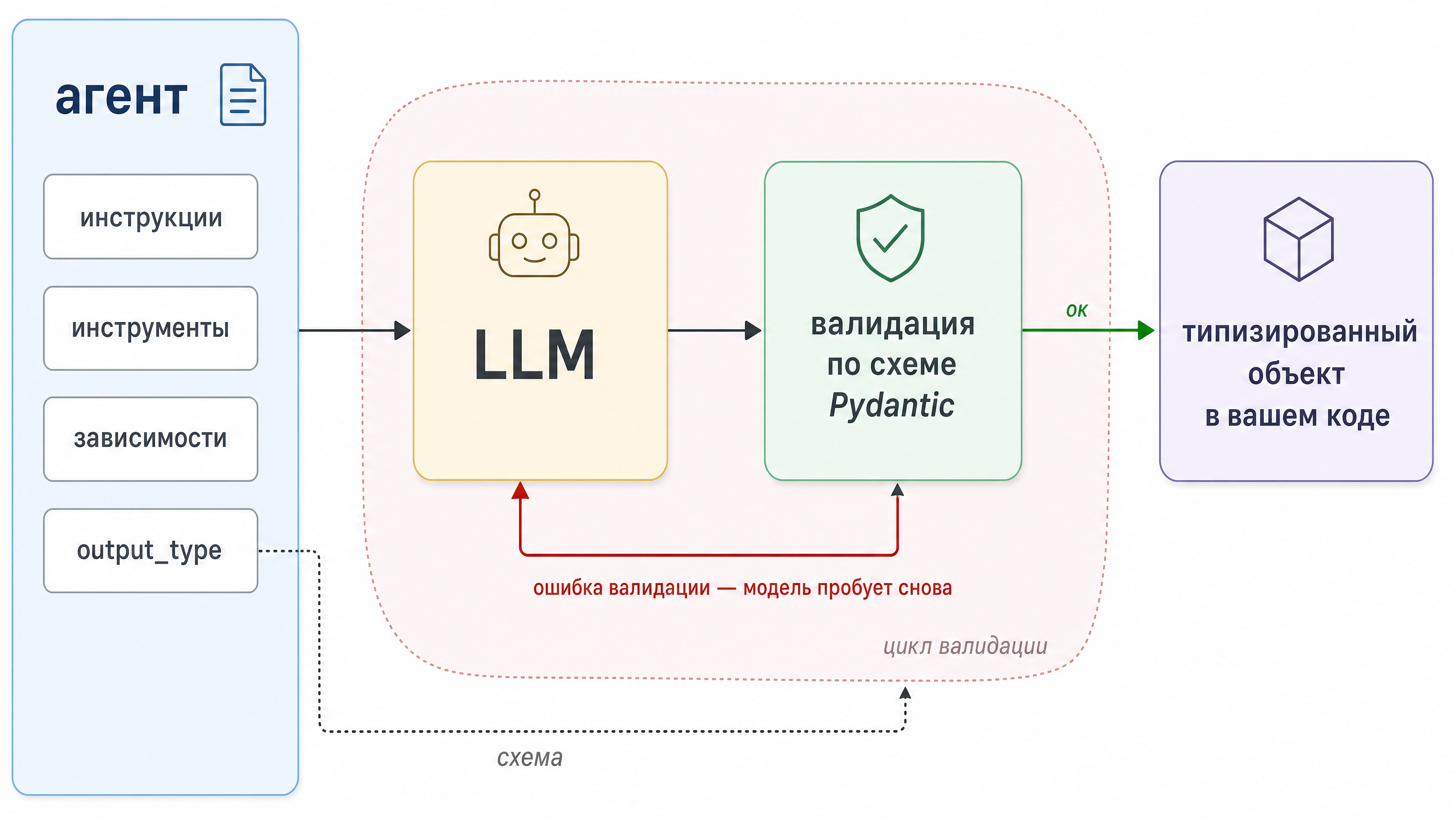 Fig. 2. An agent by contract: the answer is checked against a Pydantic schema. If it fails, the model takes another shot, and the error never reaches your logs.
LangGraph, smolagents and CrewAI: on philosophy
PydanticAI usually stands next to LangGraph, smolagents and CrewAI, but the interesting part isn’t the difference in APIs, it’s the difference in philosophy.
LangGraph is a state graph. You describe nodes (steps: a model call, a tool, your own function) and edges between them, and a state object flows through the graph: each node reads it and writes back into it. The agent loop here is a special case of a graph with a conditional edge: “if the model asked for a tool, go to the tool node, otherwise go to the exit”. You pay for that explicitness with ceremony, but you get the control a free-running loop doesn’t have. Pauses for human approval (interrupt - the graph stops and waits for a person), state checkpoints (a conversation can be frozen and resumed from any point, including from a database), branching, parallel branches. LangGraph sits well on a business process with agentic inserts. In pure research the graph starts getting in the way - you simply don’t know in advance which edges to draw.
smolagents is Hugging Face’s little thing, and its main idea is code agents: the agent answers not with a JSON tool call but with a chunk of Python that the runtime executes. Need to combine two searches and filter the result? The model just writes a loop. One turn instead of three, which you’d have paid for three times.
Expressive, no argument there. But the code is generated and you’re the one executing it, so the sandbox question is now your personal problem. Out of the box everything runs locally; for something safer there’s E2B, Modal or Docker. And if you don’t need code at all, there’s a plain ToolCallingAgent with JSON calls.
The framework itself is small, the core is around a thousand lines, readable in an evening. A good place to see how an agent runtime works inside.
CrewAI looks at the problem from the organisational side. You don’t program a loop or draw a graph here. You write a staffing plan. Every agent has a role, a goal and a backstory: “senior researcher, goal - find accurate facts, backstory - a cautious person who cites sources”. Tasks are described as assignments with an expected result, and the crew (that’s the actual term) is launched with a single kickoff() call, working through one of two processes: sequential, where tasks follow one another, or hierarchical, where a manager agent appears above the workers, hands out the work itself and checks the results. The downside is the high level of abstraction: under the hood it’s still prompts and loops, you just don’t see them, and when behaviour diverges from expectation you have to dig through the framework’s layers. There’s also a more advanced option, Flows: event-driven orchestrations where methods are wired with the @start and @listen decorators (“begin here”, “run after that”), and the state between steps is carried by a Pydantic model. The typical setup is a Flow holding the rigid route of the process, with a crew invoked at the steps where a team needs to work autonomously.
By the way, Claude Agent Teams comes to mind here, the concept is similar. There’s a lead agent that holds the plan and hands out subtasks to subagents, they work on their tasks in parallel and autonomously, return condensed summaries, and the lead assembles the final answer.
So, what to pick and when (very roughly): PydanticAI when types and contracts matter (production agents in a Python stack), LangGraph if you need control over the route: processes, approvals, checkpoints. smolagents gets picked for minimalism or for a code-writing agent, and CrewAI when the task is genuinely “team-shaped” and describing it through roles and assignments is easier than through edges and a loop.
MCP: plugging in tools
Now the protocols. Anthropic opened up MCP (Model Context Protocol) in late 2024, and within a year it became the de facto standard, picked up by OpenAI, Google and pretty much everyone. The well-known analogy stuck immediately: USB-C for AI. Before MCP every “application - tool” pair was a one-off integration with its own schema and its own hacks. Now a tool is packaged into an MCP server once and works with any client: desktop assistants, IDEs, your agent.
A quick refresher, since they might ask. The client and the server speak JSON-RPC 2.0. There are two transports: stdio (the server is a local process that the client starts itself and talks to over pipes) and Streamable HTTP (the server lives somewhere on the network). And three server-side primitives: tools, functions the model can call; resources, data that can be read (files, records); prompts, ready-made prompt templates.
There used to be a couple of client-side primitives too - sampling (the server asks the client to go to the model) and elicitation (the server asks the user for input), but sampling has been deprecated. It still works for now, but it’s on the way out.
The reason is that MCP went stateless: sessions and the initialize handshake were removed so that requests can be spread across any server instance behind a load balancer. Sampling, however, is a server-initiated call, and it needs a two-way channel held open. In its place came a general mechanism, Multi Round-Trip Requests: the server replies “I need input” with a list of requests, the client collects the answers and re-sends the original call with them attached. Elicitation moved onto the same mechanism.
A live config example, in the format you’re most likely to run into:
| |
Three things worth noticing here:
- secrets live in the process env, not in prompts - the model never sees the token, only the tool schema;
- a local server is started by the client itself, at startup, which means a config change is only picked up after a restart;
- the client fetches tool schemas with a tools/list call and then simply places them into the model’s context.
The practical payoff is that you stop writing tools for every framework separately. Write one MCP server and its tools are available to an agent on PydanticAI, on LangGraph, on anything that can speak MCP. The whole ecosystem is converging on this contract, which is why MCP became the default option.
A2A: agents talking to agents
The second acronym in the pair is A2A (Agent2Agent), Google’s protocol, introduced in 2025. It solves the neighbouring problem: where MCP connects an agent to tools, A2A connects an agent to another agent.
The scenario: a company has a researcher agent, a writer agent and an editor agent, possibly on different frameworks and from different vendors. How do they hand work to each other without knowing each other’s internals? A2A offers a contract. Every agent publishes an Agent Card, a JSON document (usually at a well-known path like /.well-known/agent.json) describing who it is, what it can do, what skills it has and how to talk to it. The client agent then creates a task on the remote agent, the task lives as an object with stages, the exchange happens through messages, and the result arrives as artifacts.
Then there’s the question of long orchestrations: how does this work when the work takes a week? Every task has a taskId, which is one unit of work, and a contextId, which ties several tasks and messages into one thread. So taskId answers “what exactly is being done right now”, and contextId answers “as part of which conversation”. You asked the researcher agent to gather material, then asked it to clarify one point based on the results, then handed the result to the editor agent: three separate tasks with three taskIds, but a single contextId. The remote agent uses it to recognise a continuation and can keep its own history and model context between tasks. Who issues the contextId is a matter of agreement: the agent may hand you its own, or accept yours.
A task is an object with state, and it lives on the executor’s side. It can sit in progress for days and weeks, and the client doesn’t have to hold a connection open for that.
Which is why there are more stages than the usual three:
- submitted - the task was accepted but not started yet;
- working - the agent is working on it;
- input-required - work is paused, the agent lacks data and is waiting for your answer;
- auth-required - work is paused, the agent lacks access rights;
- completed, failed, canceled, rejected - final states: done, broke, cancelled, not accepted.
The first four are working states, the task will still go somewhere from them. The rest are terminal - end of the line.
You can watch all this in three ways:
- polling - you call tasks/get by taskId yourself and look at the current state. Simple, but you find out with a delay;
- streaming - the agent sends you events as they happen over SSE (Server-Sent Events, a one-way stream of messages from the server over ordinary HTTP). You find out immediately, but you have to hold the connection;
- push notifications - the agent knocks on your webhook with an HTTP request (a webhook being a URL you registered with the agent in advance so it can ping you there). No connection to hold at all.
And a couple of things that matter in practice:
- if the stream breaks, and on a long task it will, there’s tasks/resubscribe, a reconnect to the same task’s stream; no need to start over.
- with a webhook the typical flow is: a notification arrives, you verify it’s genuine and call tasks/get by taskId for the full state and the artifacts. So the notification carries no data itself, it only tells you it’s time to go and fetch it. That’s why A2A fits mobile apps and serverless functions, where there’s no persistent connection in the first place.
Overall these two protocols aren’t competitors. Through MCP the agent reaches down, to tools and data, and through A2A it negotiates with an equal. If you need to remember it in one line: MCP = agent ↔ tools, A2A = agent ↔ agent.
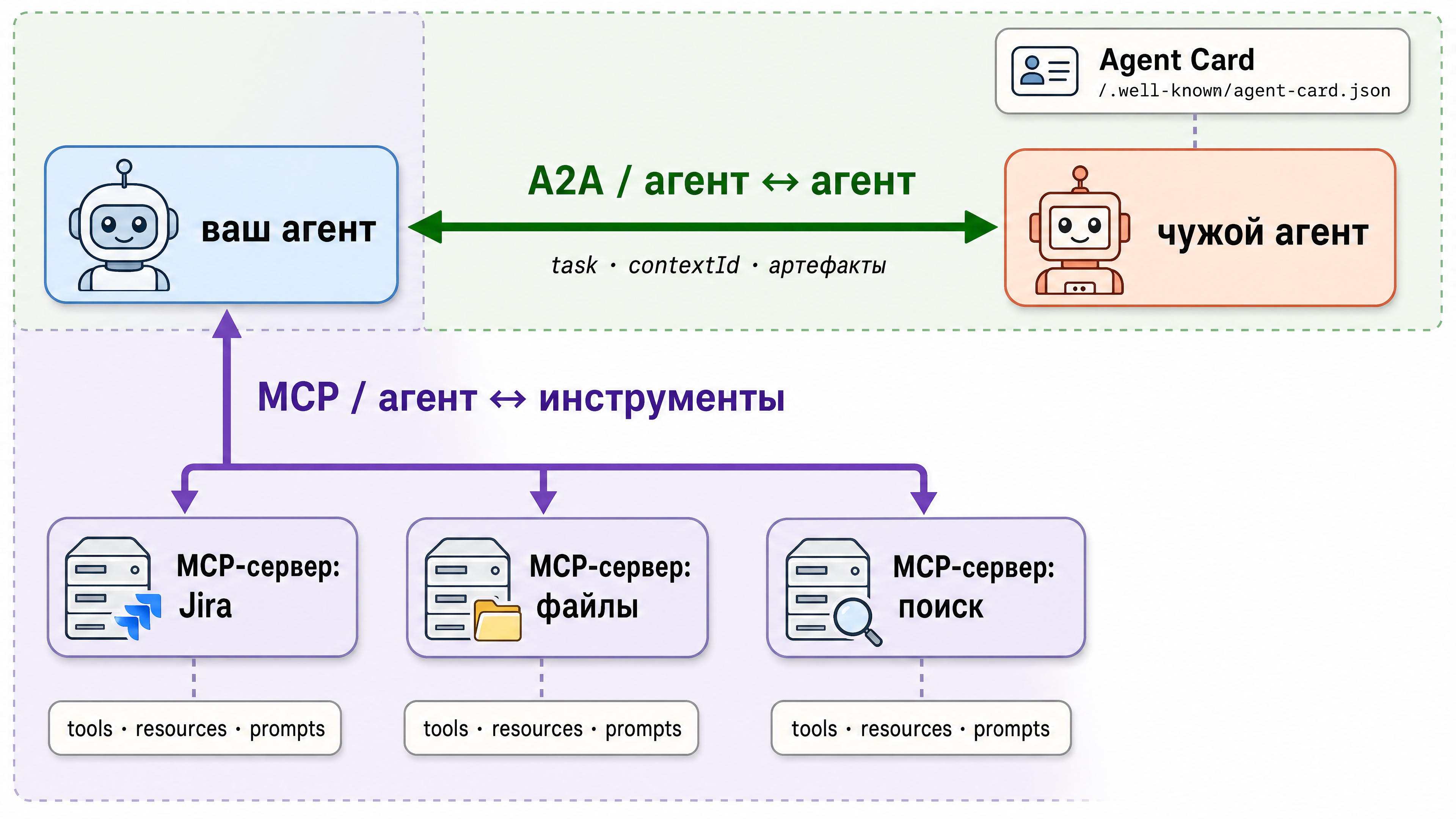 Fig. 3. Two protocols, two axes. MCP connects the agent to tools and data, A2A connects agents to each other through public Agent Cards.
Evaluating agents
Now for the murkiest part, evaluation. This is what separates agentic development from ordinary LLM work: the model is non-deterministic, the agent picks its own route, and “does it actually work well?” isn’t a question a unit test answers. So let’s figure out what to measure, then look at the agent’s path as an object of evaluation, then poke at DeepEval with code and scenarios, and finally assemble something resembling a pipeline.
Why evaluating an agent is hard
Three reasons. First: the answer is text, and “correct” is rarely binary; the same meaning can be phrased in many ways. Second: for an agent, as for the samurai, “there is only the path” - it may have answered correctly while calling the wrong tools, or incorrectly with the right ones. Third: inputs are varied and the tail is long - a hundred cases look fine, and on the hundred and first the agent goes into a loop.
The structure of metrics grows out of that, and it’s convenient to split them into three levels:
- the outcome: was the task solved, is the answer relevant to the question, does it match the facts in the context (faithfulness, for instance, is a RAG metric: the answer must not invent things absent from the retrieved documents).
- the path, or trajectory: did the agent call the right tools with the right arguments, how many turns did it take, did it go in circles.
- tokens, cost, latency. How many tokens did the task cost? How long did it take?
The LLM judge and its problems
The main instrument for evaluating text is LLM-as-judge: another model (or the same one) receives the question, the answer and the evaluation criteria - the instructions on what to award points for - and produces a score. It works in general, but the judge can be biased.
Let’s start with the criteria, since that’s the heart of it. Compare two of them: “rate the quality of the answer on a scale of 1 to 10” and “here is the list of facts that must appear in the answer; one point for each one found”. The first gives you noise, the second gives you meaningful numbers. Here’s why:
- A broad formulation makes the judge invent the criterion. “Quality” means something different every time - on one case the judge looks at completeness, on another at politeness. You end up averaging incomparable quantities.
- The 1-10 scale doesn’t work. In practice the scores bunch up at the top of the range, and the difference between a decent answer and an excellent one disappears. Three levels, or a plain yes/no, behave far more stably.
- A narrow criterion decomposes into checks. “Are all the facts there” turns into a checklist: split the reference into separate statements and ask, for each one, “is it in the answer, yes or no”. Each question is simple, judges rarely get those wrong, and the score adds up on its own.
- Reasoning before the score, not after. Ask the judge to write down why first and only then give a number. Do it the other way round and it will produce a figure and then bend the explanation to fit.
Now for another term: bias, or systematic error. A bias is not a random mistake but a consistent one - the judge is always off in the same direction. Random spread averages out over a large dataset; a bias never does, and no matter how many cases you run, the skew stays exactly the same. So here’s a short list with references:
- Length. A long, nicely formatted answer is systematically scored above a short one, even when the short one is more accurate. Which means you need an explicit line in your criteria and a control: give the judge a deliberately inflated version of a correct answer and see whether the score goes up. (Zheng et al., MT-Bench, NeurIPS 2023 - verbosity bias there)
- Position. When comparing two answers the judge tends to pick the one that comes first. What to do: run every pair twice with the answers swapped and only count verdicts that agree. (Wang et al., 2023)
- Self-love. A model rates text generated by itself (or by its family) higher. Which makes judging a GPT agent with a GPT judge a questionable idea; better to take a judge from another provider. (Panickssery et al., NeurIPS 2024)
- Leniency and agreement. The judge tends to inflate, and if you hint in the prompt that the answer is correct, it will happily agree. Don’t put anything in the criteria that gives away the expected answer. (Sharma et al., Anthropic, 2023)
Next, calibration. Label a hundred cases by hand, run the judge over them and see how well its scores match yours. A poor match means you’re measuring the judge’s preferences rather than the agent’s quality. And you’ll have to do it more than once: change the judge model or rewrite the criteria and you calibrate again. Which is why criteria and judge prompts deserve to be versioned along with the code.
And let’s not forget that you don’t need a judge where plain code will do the job for free: does the answer contain the order number? Is the JSON valid? Was the right tool called?
Agent trajectory: evaluating the path, not just the answer
A trajectory is an ordered record of everything the agent did on its way to the answer: turn by turn, which model call, which tool it picked, with which arguments, what the tool returned, what the model decided next. The answer shows where the agent arrived, the trajectory shows by which road. You end up reading it about as often as the answer itself.
An example. A support agent, a case from the dataset: “where is my order #123?”. The reference trajectory is short: lookup_order(order_id=123) → reply to the customer. Now let’s see what the agent might have done:
trajectory A (good):       lookup_order(123) → reply
trajectory B (tolerable):  search_kb("order 123") → lookup_order(123) → reply
trajectory C (bad):        search_kb("order 123") → search_kb("123") → "I don't know"
trajectory D (awful):      lookup_order(123) → lookup_order(123) → lookup_order(123) → ...
Here’s what we measure on a trajectory:
tool choice. The set of tools called against the set expected: in case B the agent called lookup_order, which counts, but grabbed an extra search_kb along the way. This is precision and recall over tools: were the needed ones called, how many extras were there. Trajectory C never called the needed tool at all, and answered “I don’t know” with the order sitting right there in the database.
call order. Sometimes it’s critical: authorisation first, then data; discount calculation first, then writing to the order. Then the trajectory is compared to the reference strictly - exact match (the sequences are identical) or in-order (the reference sequence appears in the actual one as a subsequence, extra insertions allowed). More often the order doesn’t matter and only the set does, which is any-order comparison.
arguments. Calling lookup_order with order_id=123 and with order_id=“one hundred twenty three” are different things, even if the tool name was guessed right. This is checked in two layers: syntax (the tool schema and types - this is where PydanticAI’s validation earns its keep, a malformed call simply doesn’t go through) and semantics (the judge answers a narrow question: “do the arguments match the intent of the request?”).
path efficiency. Number of turns against the reference: case B solved the task with one extra turn, not a failure in itself, but those are extra tokens and extra time. And on a hundred-case dataset an extra turn on every third case adds up to real money. Metrics like steps vs expected_steps, and the share of cases solved in the minimum number of turns.
looping. Trajectory D is the classic disease: the agent calls the same tool with the same arguments and gets nowhere. This is caught with plain code, no model required: a repeated (tool, arguments) pair back to back is a red flag, and so is a turn count above a threshold. That check costs no tokens at all.
And notice this: the answer in case C could have been polite, formally relevant and even honest (“I don’t know”), so the first-level metrics would let it through, and only the trajectory shows that the agent simply went the wrong way. That’s why the path has to be evaluated. Without it all you have is the fact of an error, with no idea at which step things went sideways.
A look at DeepEval: code and scenarios
Finally, an example. DeepEval treats evaluation like unit tests: almost ordinary pytest, only with metrics instead of asserts. Installed the usual way (pip install deepeval), run with pytest, and because of that evaluation fits into your normal development cycle and into CI without separate infrastructure.
Everything here is built on one structure, LLMTestCase. It’s a set of fields: what was asked (input), what the agent answered (actual_output), what it should have answered, which documents it retrieved, which tools it called. The first two are mandatory, the rest are filled in as needed, depending on what your chosen metrics require. A metric takes such a case and returns a score from 0 to 1, a threshold above which it counts as a pass, and, in plain text, why it gave that score. The last part is useful: when a test fails you don’t read “0.42 < 0.7”, you read which specific fact was missing from the answer.
Scenario one: a RAG answer. The agent answers questions from a knowledge base, and we want the answer to be on point and not invent facts beyond what was retrieved:
| |
Let’s unpack what happens here. AnswerRelevancyMetric asks whether the answer actually addresses the question asked (rather than saying something polite about a neighbouring topic).
FaithfulnessMetric goes deeper: it breaks the answer into atomic claims and checks each one against the retrieval_context. If the agent invents “without a receipt you can’t return anything at all”, the metric fails, because the context talks about a gift card. This is the main defence against hallucinations in RAG. Thresholds are set per task: in support, faithfulness is kept high (0.85-0.9), relevance can be looser.
That said, the built-in metrics never cover all your requirements. Say you want the answer not to promise anything absent from the return policy, and to end with a concrete next step - what exactly the customer should do next. There is no “ends with a clear next step” metric in the box, and it still needs checking.
For cases like that DeepEval has GEval. It’s a metric constructor: you state the criterion in plain text and it assembles an LLM judge out of it - expands the criterion into a sequence of evaluation steps, runs the model through them and returns a score from 0 to 1 with an explanation. The name comes from the G-Eval paper, which showed that a judge given a spelled-out evaluation procedure, rather than a bare criterion, agrees with humans much better. Here it is:
| |
Note the shape of the criterion: not “rate the quality” but a procedure with steps - list them, check each one, count. This is exactly the narrow-criteria principle from the judge section: the more procedural the criterion, the less noise, and the more honest the reason the metric returns with the score.
Scenario two: trajectory and tools. Same support agent, same “where is my order #123?” task. In DeepEval the called tools go into the same test case, and ToolCorrectnessMetric compares them with the expected ones:
| |
The metric compares two lists: which tools should have been called and which actually were, taking names and arguments into account. In this example the needed lookup_order is there and the extra search_kb drags the score down, which is our case B from the trajectory section. A threshold of 0.5 means “extra calls tolerated, a missing required one not”. Where to get the list of calls depends on the framework: in PydanticAI the message and tool-call history comes out of the result object (result.all_messages() and the calls inside it), in LangGraph out of the graph state, and the universal way is to pull them from an OpenTelemetry trace, which is coming up below.
And scenario three: was the task solved at all. TaskCompletionMetric is a judge that receives the task, the call trace and the answer and decides whether it’s done. It’s a first-level metric in its purest form, and it’s best placed at the very end: even when all the specific metrics are green, the question “was the task solved?” catches the agent that formally did everything and substantially did nothing.
A couple of small things. Cases are worth collecting into datasets (in DeepEval that’s EvaluationDataset, and in the Confident AI cloud the same datasets with a UI) and running in batches rather than one at a time. Every metric score comes with a reason, the judge’s explanation in text; read those on the failed cases, they usually show straight away what broke.
An evaluation pipeline from scratch
Now let’s assemble the whole pipeline, piece by piece, the way it gets built when all you have at hand is pytest and common sense.
Part one, the golden dataset. Not a thousand synthetic cases, but fifty to a hundred real ones to start with: questions from production or from the client, with reference answers or at least with criteria (“must state the price and the deadline”, “must not promise a refund”). Volume is secondary here. Synthetics from the same model measure the agent in its own language and miss exactly the failures that real people run into.
Part two, the run. The dataset goes through the agent in full, with everything recorded: the answer, the trajectory (tool calls, turns, tokens), the timing. The run has to be reproducible, so pin the version of the prompt, the model and the tools. Otherwise, when results diverge, you won’t know what actually changed.
Part three, the evaluators. Layers, from cheap to expensive: deterministic checks (the answer isn’t empty, the JSON is valid, there are no repeated calls with identical arguments), path checks (the required tool was called, the arguments are correct, no more than N turns), and only then LLM judges with narrow criteria. The cheap layers filter out a good share of failures for free, and there’s no sense sending the judge after things a string comparison catches.
Part four, aggregation and thresholds. The metrics go into a report: the average over the dataset, a breakdown by case type, a comparison with the previous version. Then a threshold in CI: faithfulness drops below 0.85 or cost rises above budget, and the build goes red. From that point on the agent’s quality stops being a topic of discussion and becomes a merge requirement.
Part five, feedback from production. Cases where the agent failed get analysed and go into the dataset; traces with bad user feedback go there too. The dataset grows on your own mistakes, the pipeline catches regressions, and quality finally becomes something you manage rather than hope for.
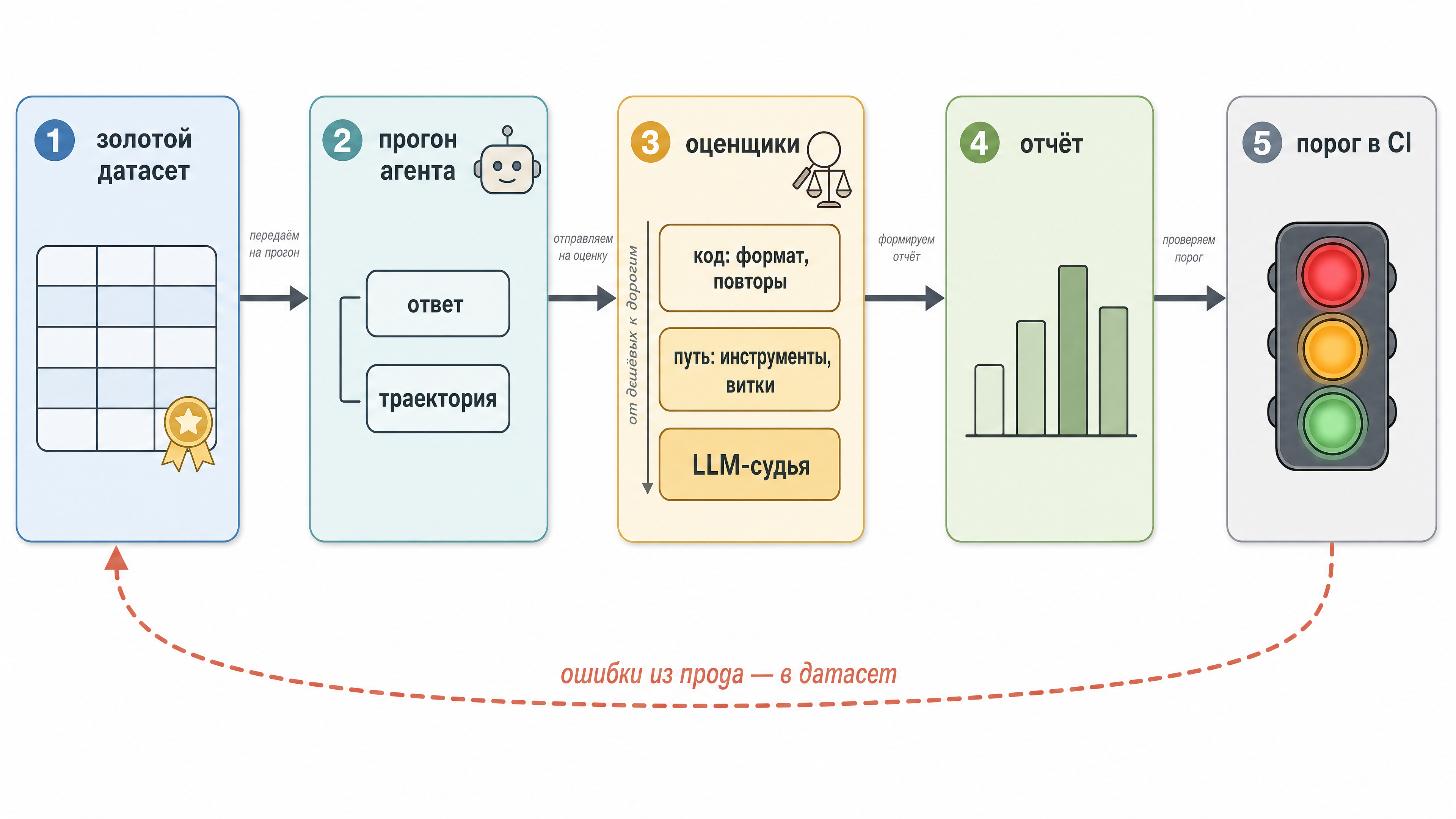 Fig. 4. The whole evaluation pipeline: golden dataset → agent run with traces recorded → layers of evaluators from cheap to expensive → a report with a CI threshold → failed cases go back into the dataset.
A little about RAG
The model’s context is limited and costs money, and there can be a lot of documents - they won’t all fit. On top of that, the longer the context, the more readily the model loses what matters inside it (this is known as context rot). So the job is to keep less in the context, and only the parts that matter.
Hence RAG (Retrieval Augmented Generation). Documents are chopped into pieces in advance, each piece goes through an embedding model and comes out as a vector, a set of coordinates in a multidimensional semantic space where pieces with similar meaning end up close together. Closeness is measured by the angle between vectors, the “cosine similarity” everyone has heard of. And that’s how we find some number of pieces with a similar meaning.
The illustration below has the acronym HNSW on it. It’s one of the algorithms for finding those nearest neighbours. Scanning a million vectors on every query is far too expensive, so the database builds a graph of connections between them in advance and hops along it: big jumps into the right region of the space first, then small ones near the target. It works fast, but the answer is approximate - occasionally the true nearest neighbour gets lost along the way. How thoroughly to search is up to you, through the index settings: the more thorough, the slower.
That said, this article isn’t about RAG and vector databases, it’s more of a reminder.
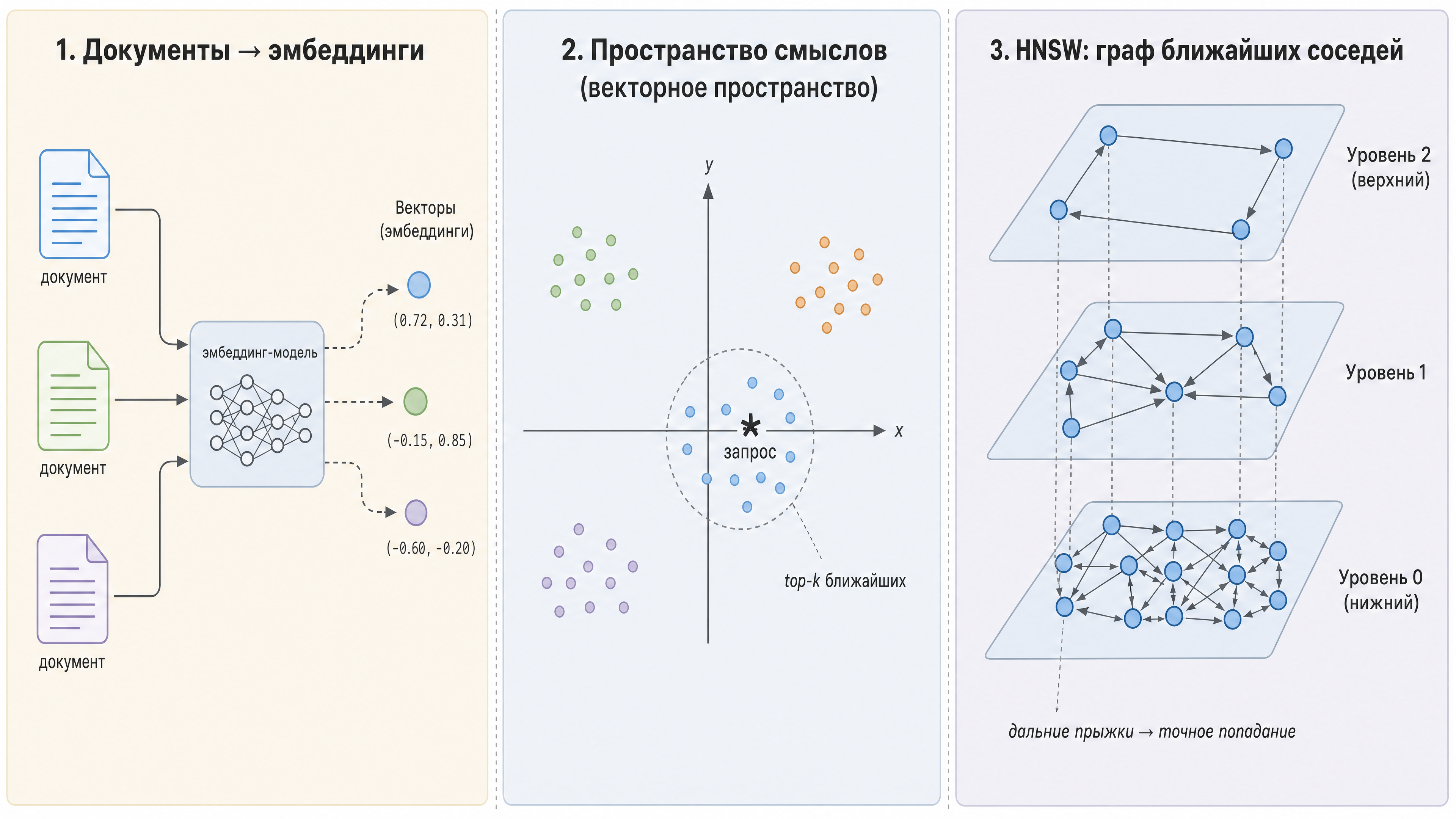 Fig. 5. Documents turn into vectors and become points in a semantic space, the query is the star, and the database returns its k nearest neighbours. On the right is that same HNSW: a multilayer graph helps find them, with sparse upper levels for long jumps and dense lower ones for landing precisely.
OpenTelemetry
Worth mentioning OpenTelemetry as well, the instrument for analysing traces and a way to understand what is actually going on in production.
OpenTelemetry (OTel) is an open telemetry standard: traces, metrics, logs, a single protocol (OTLP), collectors and exporters into any backend (Jaeger, Tempo, Datadog, and from our world Langfuse, Logfire, the same Opik). What we need is the trace: a record of one request as a tree of spans. A span is a single operation with a name, a start time, a duration, attributes and a parent.
Now put that on an agent - look at the example in the illustration. The root span is the agent run (12 seconds). Inside it are spans of model calls (with attributes: which model, how many input and output tokens, what it cost), spans of tool calls (which tool, which arguments, which result, how long it took), and inside those, spans of wherever the tool went: an HTTP request, a vector database, whatever. So instead of “the agent took twelve seconds” you now see that five of them went on searching the database, because the index isn’t on metadata, and that the model was queried twice because a tool came back empty. That you can already fix.
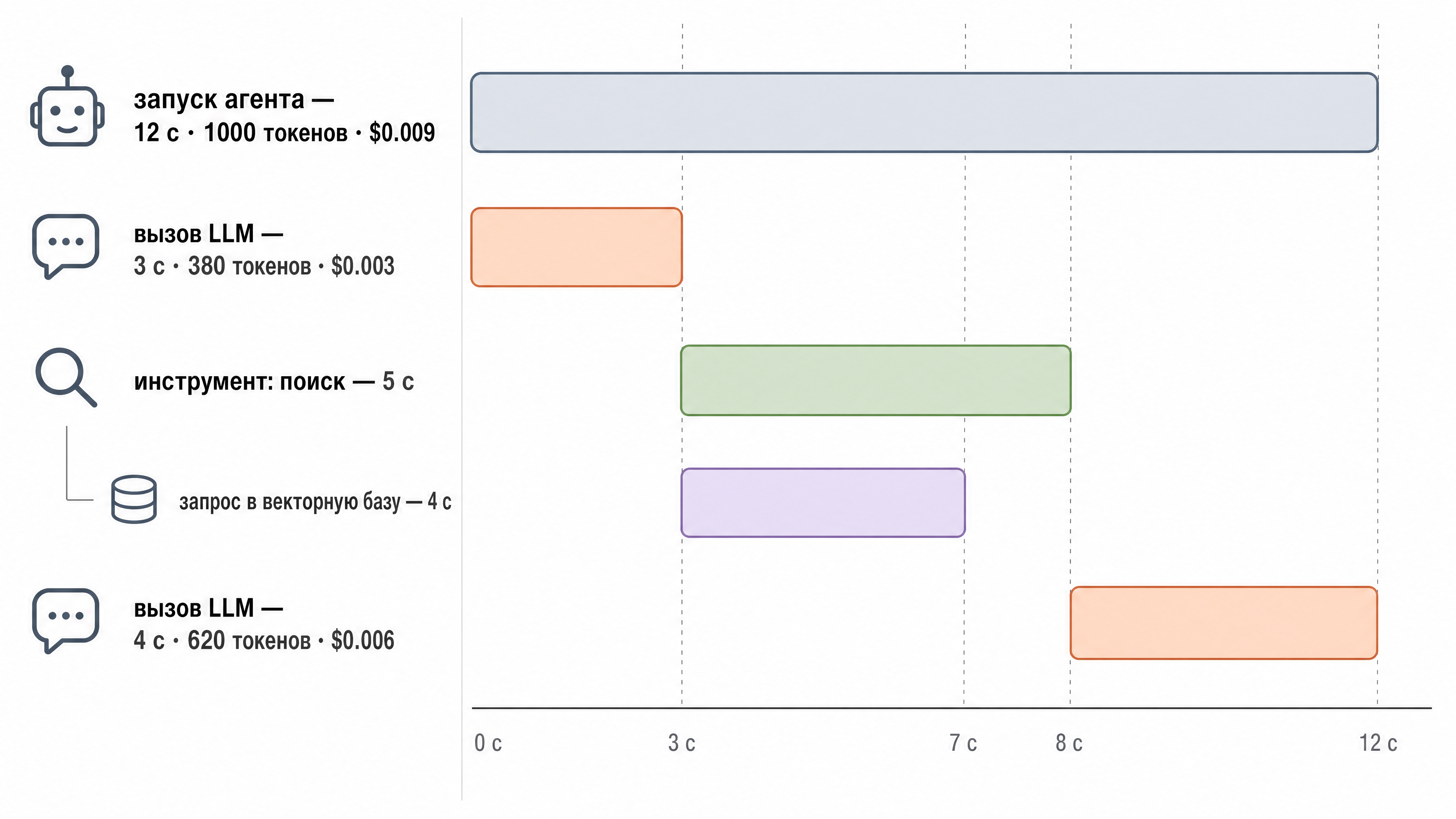 Fig. 6. A trace of a single agent run: the root span and nested spans of model and tool calls with attributes - model, tokens, cost, duration. A waterfall like this shows where the agent lost time and money.
Wrapping up
So, the goal was to cover the agentic development stack and help you build a general picture of what it consists of - and ideally to fight off persistent interviewers with their nasty questions. If inspiration strikes, we’ll talk about other interesting things like Claude Agent Teams and Dynamic Workflow, or about building a pipeline engine on your own DSL for specific tasks, to work around the shortcomings of the technologies above and get the work done cheaper. If…